
AngularJS組件化開發
turanaishangn angularjs
# 創建項目
ng new 項目名
# 運行項目
cd 項目名 ng serve -o
# 結構
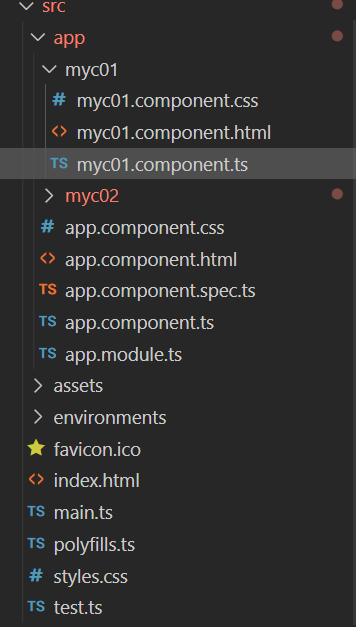 mcy01 mcy02 自己添加的組件
# ts文件詳解
//組件的邏輯文件

//安裝插件

//組件製作完成後,必須註冊到全局中,才能夠使用(在app.module.ts中註冊)

//插件快捷生成:ng-component
import { Component, OnInit } from '@angular/core';

@Component({
    //組件名  使用  <app-myc01></app-myc01>
    selector: 'app-myc01',
    //組件關聯的html
    templateUrl: './myc01.component.html',
    //組件關聯的css
    styleUrls: ['./myc01.component.css']
})
//組件類名:
export class Myc01Component implements OnInit {
    constructor() { }

    ngOnInit(): void { }
}
//組件可以複用
<h1>Hello World</h1>
<app-myc01></app-myc01>
<app-myc02></app-myc02>

<!--
    組件製作方式固定,快捷命令:
        全稱:ng generate component 組件名
        簡寫:ng g c 組件名
 -->
# 數據,事件,屬性
import { Component, OnInit } from '@angular/core';

@Component({
  selector: 'app-myc03',
  templateUrl: './myc03.component.html',
  styleUrls: ['./myc03.component.css']
})
export class Myc03Component implements OnInit {

  //類中的一些屬性,顯示到html文件中
  name = 'HJY'
  age = 18
  num = [1, 2, 3, 4, 5, 6, 7, 8, 9, 10]
  stu = {
    name: 'JERRY',
    sex: 'boy'
  }
  constructor() { }

  ngOnInit(): void {
  }

}
<ul>
  <li>{{name}}</li>
  <li>{{age}}</li>
</ul>
<ul>
  <li>{{num}}</li>
  <li>{{num[0]}}</li>
  <li>{{num[1]}}</li>
  <li>{{num[5]}}</li>
</ul>
<ul>
  <li>{{stu}}</li>
  <li>{{stu.name}}</li>
  <li>{{stu.sex}}</li>
</ul>
import { Component, OnInit } from '@angular/core';

@Component({
  selector: 'app-myc04',
  templateUrl: './myc04.component.html',
  styleUrls: ['./myc04.component.css']
})
export class Myc04Component implements OnInit {


  title = '提示信息(屬性的綁定)'

  showName() {
    return '對象方法使用'
  }

  chickB() {
    alert('點擊事件')
  }

  constructor() { }

  ngOnInit(): void {
  }

}
<ul>
    <li>{{ 1+1 }}</li>
    <li>{{ 3-6 }}</li>
    <li>{{ 5*8 }}</li>
    <li>{{ 9/3 }}</li>
    <li>{{ 9%2 }}</li>
    <li>{{ 5*5>26?'dui':'cuo' }}</li>
    <li>{{ 5+9 == 10 }}</li>
</ul>
<!-- 類中的方法 -->
<h1>{{ showName() }}</h1>
<!-- 點擊事件 -->
<!-- (click) -->
<button (click)="chickB()">點擊事件</button>
<!-- 屬性的綁定 -->
<!-- [] -->
<h1 [title]="title"> 提示信息</h1>
<!-- 特殊屬性綁定 -->
<div>{{ html }}</div>
<div [innerHTML]="html"></div>
<!-- 雙向數據綁定 -->
<!-- ngModel默認不加載雙向數據綁定,必須手動開啟 -->
<div>
    <input type="text" [(ngModel)]="name" />
</div>
<h1>{{ name }}</h1>
<!-- 動態樣式 -->
<!-- 動態變化的樣式style  必須是對象類型的值 -->
<!-- 對象類型屬性名  不能含有中劃線- 所以font-size要加'',或者寫成fontSize -->
<div>
    <span [ngStyle]="{color: 'orange','font-size': size+'px'}">{{ color }}:{{ size }}</span>
    <br>
    <span [ngStyle]="{color: 'orange',fontSize: size+'px'}">{{ color }}:{{ size }}</span>
</div>
<!-- 自增++ 和 符合運算符+= 不支持在html中使用 -->
<!-- [ngClass]支持動態樣式變更 -->
<button (click)="size = size +1" [ngClass]="{'danger': size>18}">變大</button>
<button (click)="size = size -1" [ngClass]="{'success': size<=18}">變小</button>
ngModel默認不加載雙向數據綁定,必須手動開啟
import { NgModule } from '@angular/core';
import { BrowserModule } from '@angular/platform-browser';
//引入這個模塊才能實現雙向綁定
import { FormsModule } from '@angular/forms';

import { AppComponent } from './app.component';
import { Myc01Component } from './myc01/myc01.component';
import { Myc02Component } from './myc02/myc02.component';
import { Myc03Component } from './myc03/myc03.component';
import { Myc04Component } from './myc04/myc04.component';
@NgModule({
  declarations: [
    AppComponent
  ],
  imports: [
    //使用  注入
    BrowserModule, FormsModule
  ],
  providers: [],
  bootstrap: [AppComponent]
})
export class AppModule { }
# 自定義指令
ng g d 指令名字
import { Directive, ElementRef } from '@angular/core';

@Directive({
  selector: '[appAppUpper]'
})
export class AppUpperDirective {

  constructor(e: ElementRef) {
    console.log(e);
    //獲取焦點
    e.nativeElement.focus();
    //大寫
    e.nativeElement.value = e.nativeElement.value.toUpperCase();
  }

}
# 管道
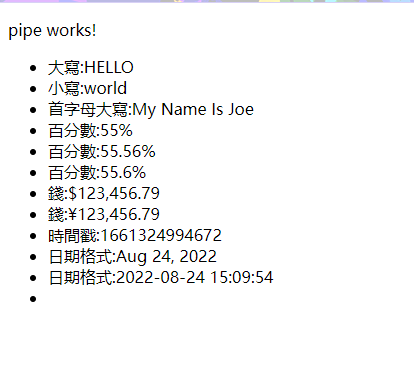
<p>pipe works!</p>
<!-- pipe  管道 -->
<!-- 常用管道 -->
<ul>
    <li>大寫:{{ "hello" | uppercase }}</li>
    <li>小寫:{{"WORLD" | lowercase}}</li>
    <li>首字母大寫:{{ "my name is joe" | titlecase }}</li>
    <li>百分數:{{ 0.55 | percent }}</li>
    <li>百分數:{{ 0.555555 | percent:"2.2" }}</li>
    <li>百分數:{{ 0.555555 | percent:"2.1" }}</li>
    <li>錢:{{ 123456.789 | currency }}</li>
    <li>錢:{{ 123456.789 | currency:"¥" }}</li>
    <li>時間戳:{{ time }}</li>
    <li>日期格式:{{ time | date }}</li>
    <!--
        year 年 y
        month 月 M
        day 日 d
        hour 時 h(12小時) H(24小時)
        minute 分 m
        second 秒 s
    -->
    <li>日期格式:{{ time | date:"yyyy-MM-dd HH:mm:ss" }}</li>
    <li></li>
</ul>
# 自定義管道
<p>pipe-cre works!</p>
<table border style="text-align: center;">
    <thead>
        <tr>
            <td>序號</td>
            <td>名字</td>
            <td>年齡</td>
            <td>性別(三目運算)</td>
            <td>性別(自定義管道)</td>
            <td>性別(自定義管道|傳參數)</td>
        </tr>
    </thead>
    <tbody>
        <tr *ngFor="let item of stu; let i=index">
            <td>{{i+1}}</td>
            <td>{{item.name}}</td>
            <td>{{item.age}}</td>
            <!-- 三目運算 -->
            <td>{{item.sex==1?"男":"女"}}</td>
            <!-- 性別需要製作一個gender管道 -->
            <!-- 命令:ng g p 管道名 -->
            <td>{{item.sex | gender}}</td>
            <td>{{item.sex | gender:"en"}}</td>
        </tr>
    </tbody>
</table>
使用指令 ng g p 名称
import { Pipe, PipeTransform } from '@angular/core';

@Pipe({
  name: 'gender'
})
export class GenderPipe implements PipeTransform {

  transform(value: unknown, ...args: unknown[]): unknown {
    console.log(args[0]);
    if (args[0] == 'en') {
      if (value == 0) return 'girl'
      if (value == 1) return 'boy'
    } else {
      if (value == 0) return '女'
      if (value == 1) return '男'
    }
    return null;
  }
}
# 生命周期
常用生命周期
import { Component, OnInit } from '@angular/core';

@Component({
  selector: 'app-myc01',
  templateUrl: './myc01.component.html',
  styleUrls: ['./myc01.component.css']
})
export class Myc01Component implements OnInit {

  names = ["jerry", "joe", "marry"]

  constructor() {
    //面向对象中:类的构造方法
    console.log('constructor:构造方法,组件出生的第一时间触发');

  }

  ngOnInit(): void {
    //init 初始化,类似于vue中的mounted
    console.log('ngOnInit:组件中的内容开始初始化');

  }

  ngAfterContentInit(): void {
    console.log('ngAfterContentInit:组件中的数据初始化时触发');
  }

  ngAfterViewInit(): void {
    console.log('ngAfterViewInit:组件上的UI界面初始化时触发');
  }

  ngAfterContentChecked(): void {
    console.log('ngAfterContentChecked:组件上数据变化时触发');
  }

  ngAfterViewChecked(): void {
    console.log('ngAfterContentChecked:组件上的UI界面随数据变化而更新时触发');
  }

  ngOnDestroy(): void {
    console.log('ngOnDestroy:组件销毁时触发');
  }

}
# 掌控子元素
<button (click)="change()">修改 第一个 myc02的name值</button>

<!-- 给要掌握的子组件一个唯一标识:类似 id='xxx' -->
<!-- 简写写法: 语法糖 类似于css  # 代替了id -->
<app-myc02 #myc02></app-myc02>
<app-myc02></app-myc02>
<app-myc02></app-myc02>
import { Component, ViewChild } from '@angular/core';

@Component({
  selector: 'app-root',
  templateUrl: './app.component.html',
  styleUrls: ['./app.component.css']
})
export class AppComponent {
  title = 'NGPRO';
  show = true;
  //view 查看 静态类型 变量名 类型名
  @ViewChild('myc02') myc02: any;
  change() {

    //修改myc02的属性
    this.myc02.age = 99
    this.myc02.name = "joe"
    this.myc02.show();
  }
}
# 父子传参
父传子 使用@Input 子传父 子元素不能获取父元素的索引 父元素需要通过属性的方式 传递一个方法给子元素 子元素通过这个方法来传递信息给父元素 @Input() age!:number; 父元素中
 //ts
showM(msg: string) {
    console.log("msg", msg);
    this.msg = msg
  }

//html
<app-myc04 (msgEvent)="showM($event)"></app-myc04>
子元素中
//ts
@Output() msgEvent = new EventEmitter();

//html
<!-- emit()  触发 -->
<!-- 触发msgEvent 中的函数 -->
<button (click)="msgEvent.emit('a')">aaaaaaa</button>
<button (click)="msgEvent.emit('b')">bbbbbbb</button>
<button (click)="msgEvent.emit('c')">ccccccc</button>
# 服务
ng g s 服务名